

- Link to Alma login.
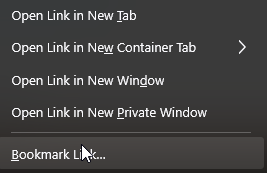
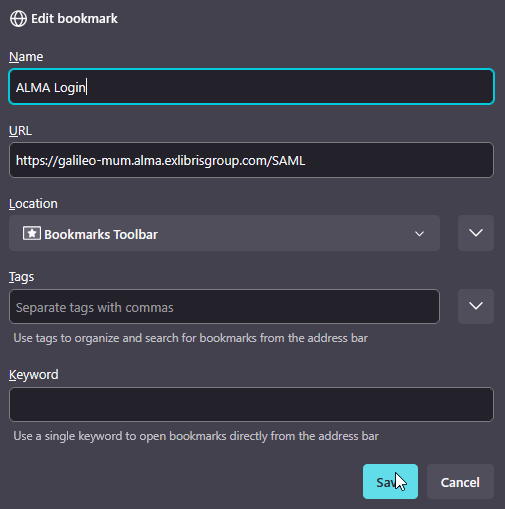
- If you are using the Mozilla Firefox browser, you can right click on the above link and add this login page to your bookmarks directly from the menu. Give it a descriptive name such as “Alma login” and click save.
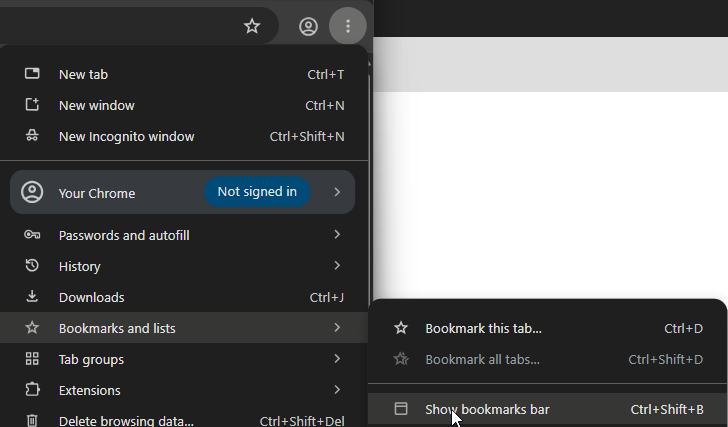
- If you are using the Google Chrome browser, click on the “kebab” menu icon to the right of the address bar, then navigate to “Bookmarks and lists” and “Show bookmarks bar.”
 With the bookmarks bar open, you can simply drag the “Link to Alma login” link above into the bookmarks bar to save it.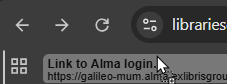
- The Alma link should already be saved to the Firefox browser as a bookmark. If the bookmark seems to be missing, you can click the link to Alma login here.
- The username and password fields should already be prefilled; if they are not, ask the staff person on duty to assist you.